Archive | Reference Information RSS feed for this section

8 16 12 CSI Conference Call Agenda and Notes

CSI Conference Call Agenda, Draft

8/16/12, 1-2pm (note time change)

1-877-402-9753

Passcode 1608056#

  1. Introductions and welcome Jane Grant and Matt Hamburg
  2. Guest presenter: npserv
    1. Using remote connection to create, save and manipulate confidential documents
    2. Confidential computing practices
    3. General Zimbra and Shared files Q&A
  3. Hannan Updates
    1. Save the dates:
      1.                                                                                        i.      October 1-2 is “Co-op 102” hosted at Hannan; facilitated by CSI (note: our 10/4 conference call will be cancelled that week)
      2.                                                                                      ii.      October 1st: post work baby shower for Lindsay and Laura (and anyone else who drinks the water between now and then)
      3.                                                                                     iii.      Tuesday, October 23,  12noon-2pm, ADL Assessment training by Brenda Carney (Note: our 10/25 conference call is cancelled)
    2. RJ academic year schedule starting Sept 6th; and PTO 10/4-10/10
  4. CSI Updates
    1. Role of Liaison on Duty
      1.                                                                                        i.      Hold status quo
      2.                                                                                      ii.      Attend general, council and other important co-op meetings
      3.                                                                                     iii.      Refer members to their House rules and Bylaws
    2. Monthly meetings
      1.                                                                                        i.      Role of Liaison is to call your monthly meeting, but co-op culture is that they liaison isn’t responsible for assuring the members take responsibility for attending  (this is true of any co-op meeting, including council meetings).  You can broach the idea of whether it would be a good idea if somebody made reminder calls the day before your monthly meetings to assure more representative participation. This cannot be the liaison or the SC, so a co-op member (the President, FCRC Chair, or Education Chair) would have to volunteer to do this.
      2.                                                                                      ii.      Please bring your co-op specific contact sheet to your next monthly meeting and update it with your new co-op leadership and any missing information. Please update the sheet and resave it to the shared drive so that we all have access to the updated information (this is especially important for your substitute SC and me). Thanks.
      3.                                                                                     iii.      Please ask for updated House Rules and Bylaws if they have changed since your start date. Please give me a copy of the new ones. You won’t automatically receive updates, so it’s a good topic for monthly meetings.
    3. Co-op 102
      1.                                                                                        i.      Email RJ and Sharon scenarios ahead of time
    4. Communication with liaisons. Ask which mode of communication is best for them. If having challenges with liaison responding, please cc Anne Sackrison and me. You all know the liaisons are really busy with multiple co-ops and other  job duties, so take a bit of time at each monthly meeting to learn more about their role, which should help find some common ground for communication.
  5. AASC Online Updates
    1. Remember to complete your SC Daily Log. You are aiming for an average of no greater than 25-30% of your time doing administrative tasks. If you are having a challenge with this, please let me know and we can discuss.
    2. Frail and at risk members are only calculated in your Semi Annual Reports for members who are 62+. Hence, if you have a co-op with younger adults who are frail and at risk, please print a customized service report and attach it to your Semi Annual Report in order to capture the number of frail and at risk younger adults with whom you work.
    3. How many Semi Annual Reports does each property submit? Good question. I need to talk with our HUD representative about this. It differs regionally and depending on type of grant. I’ll get back with you soon.
    4. You can, and should, do a Cost Savings report and progress note (no service log) for members of the co-op who are not clients, but have benefitted financially from your services (ie you hosted a Senior Project Fresh educational workshop at the co-op and all attendees received Farmers Market vouchers worth “x” dollars.
    5. I heard some familiar voices asking the very best questions during the AASC Online training yesterday. I wanted to let you know that you can always contact Jenell to ask questions or ask her for a listing of upcoming trainings she’s already scheduled, and she’ll email you an invitation to attend whichever one works into your schedule.
    6. I confirmed with Cheryl that you can deactivate inactive community members 2 months after your last necessary contact (ie you’ve followed up on services rendered and/or you’ve made 2-3 attempts to follow up and have not received a reply). You cannot deactivate a resident member unless they move out or pass away.
  6. Additional Items
  7. Next meeting facilitated by Diane Crawford

Comments { 0 }

Difficulties with Skype Audio

I connected with John at npServ this afternoon and he provided a suggestion in case someone is not able to hear you while utilizing Skype:

While in Skype click on the small arrow(in the bottom right hand corner that indicates, “show hidden icons”, right click the bright green arrow and click “quit”, unplug the webcam from the hard drive (waiting a minute or so) and plug the camera back in the USB.

After completing these steps, you “should” be able to hear one another clearly.  Hope this helps 🙂

Comments { 0 }

Monitor your monitoring

As soon as you end a visit with a member, the clock starts ticking.

As service coordinators, we are obligated to see our “frail” and “at risk” members every 30 days. Those who are not “frail” or “at risk” must be seen every three months. This means that if we see a frail member on August 13, our next appointment should be scheduled before September 13.

In fact, Hazel Park Service Coordinator Alexa Lempert recommends using the following link to keep precisely up-to-date on client visits:

http://www.timeanddate.com/date/dateadd.html

The easiest way that I’ve found to keep track of client monitoring is by creating a simple spreadsheet. My spreadsheet consists of several different tabs that include various different lists.

You can create a tab in an Excel file by going to the very bottom of the spreadsheet. There, you can right click and voila! Rename the sheet to suit your needs.

To keep track of visits and contact with my “frail” and “at risk” clients then, I run a simple list in Excel. On the left side of the list are names, on the right side — you guessed it — the date when I had last seen him or her.

To some, Excel can be rather intimidating. However, in this instance, the program makes it pretty easy to track clients. In Excel, you can highlight names as well as add and delete entire rows. This can be particularly helpful as members become deactivated or when new members move in.

Additionally, you can run several different lists using Excel. My lists include: Enrolled Members, Active Members with Non-Participation Forms, Active Members who are Frail and At Risk, Active Members who are not Frail and At Risk.

At the very bottom of this post, you will find the word “Example” in blue. This is a link to a sample spreadsheet. If you are not familiar with Excel, please feel free to open the link (or open Excel on your hard drive) and play around with it a bit. It is quite a simple program, once you get used it.

By keeping these running lists, I know who’s who at all times — and so far, it’s worked for me!

Do you have any tracking tips?

Please share, and thanks!


Comments { 1 }

August 9 Meeting Recap

August 9 Meeting Recap

Logic Models

Wendy provided each of the service coordinators with a booklet on how to complete logic models. Additional copies of the booklet can be found on the shared drive under file name:

S:\Program Staff\Service Coordination\Reporting, Program Evaluation & Logic Models\HUD Semi Annual Reporting How-to.docx

The logic model is a two-part document.

Each Service Coordinator has a logic model specific to his or her site; this model includes only resident data.

Additionally, each coordinator has a standard “outcomes” logic model. Consider this the “essay” part of the report. Data for this logic model includes both co-op and community residents.

Notes for completing logic models include:

  1. Field #1: Policy priority-Capacity Building and Information Sharing, Participation in, or creation of face-to-face networking meetings with other HUD Service Coordinators and local government aging and/or disability: Count each time you’ve met with other service coordinators or other service provider.
  2. Field #2: Policy priority-Capacity Building and Knowledge Sharing-Number of new strategies implemented to address service needs and increase local capacity [Strategies]: The “strategy here is defined as service coordination in your building. The answer to this field is 1.
  3. Field #9: Case Management- Reduction in move-outs to higher level of care [Residents]: Ask members “Would you have moved out if you hadn’t received this service I helped you with?”

Future Conference Calls

The conference call scheduled for August 16 will focus on storing confidential files on the shared drive, along with cleaning confidential files out of your hard drive.

To improve the impact of weekly conference calls, SCs will be writing the agenda. Agendas should be submitted to Rachel for approval prior to the meeting.

Upcoming Agenda writers:

August 23: Diane

August 30: Renee

Other points of note

Think safety: Arrange your office so that you have quick access to the door in case a client becomes physically aggressive. Incidences of sexual advances made by clients should be reported to Rachel.

Best practice tip: Try to include emergency contacts on consent to release forms.

Due dates: Check requests are due every other Thursday. Rachel has added these days to her Zimbra Calendar to help SCs keep track.

Comments { 0 }

Social Security Michigan August Updates

The August issue features:
  • Huntington’s Disease Added to List!
  • Stay Connected!
  • Ticket Training Tuesdays!
  • Support for those Ready to Work!
  • SSI Employment Supports!
  • Mandatory Direct Deposit!
 
 
Vonda VanTil
Public Affairs Specialist
Social Security
3045 Knapp St NE
Grand Rapids MI 49525
w. 1-877-322-5883 X 18872
Comments { 0 }

Information regarding required CEU’s

I recently spoke with Judy Chavis at AASC and discussed whether or not individuals who have completed their first year of 36+ required CEU’s for Service Coordinators with a different organization, under a different grant,  are required to full fill this requirement again.  According to Judy, she revealed that these individual do not have to full full these requirements again and are only required to complete the necessary 12 CEU’s per year.

In addition, Rachel provided the following information:

“News that Cheryl and I learned on a HUD Webinar last week is that applicable academic work within the past year also apply.”

Comments { 0 }

Region XI NASW Michigan Event

Region XI NASW-MI Member,
You are invited to an August gathering of social workers in Wayne County!

When:

Saturday, August 112012

Time: 11:00am – 1:00pm

Where:

Williams Pavilion

99 E Forest, Detroit, MI  48201

14th Floor “Penthouse”

 *Unmetered parking in lot off of Forest west of John R


Comments { 0 }

NASW Michigan has an Aging Special Interest Group

For SCs who are social workers, NASW has an Aging Special Interest group to help you keep up with new developments.

If you are interested in joining any of these special interest groups, please contact the NASW-Michigan office at office@nasw-michigan.org or at 517-487-1548.

Comments { 0 }

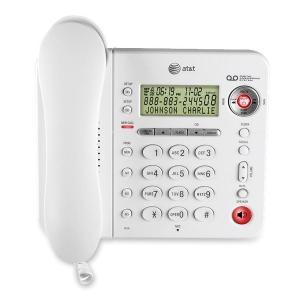
Silencing voicemail on the AT & T 1856 phones

If voicemail is playing out loud on your white, AT& T 1856 phone, it means you have “call screening” on. You probably want to turn it off! Here’s how:

(See pages 25-26 of your phone manual.)

Press and hold the “TAS Setup” button (top left of your phone). Keep pressing it; it will go through lots of different features until you reach “Call Screening.” When you finally reach “Call Screening,” hit the “Skip” or “Repeat” toggle button (top right of your phone) to change it from ON to OFF. Now, you won’t hear callers as they leave messages. Yay!


Comments { 0 }

What’s going on with integrated care?

Here are two good Powerpoint presentations from yesterday’s Aging Services Consortium meeting for you to see what’s going on with integrated care, dual eligibles, etc.

https://intranet.hannan.org/wp-content/uploads/2012/08/Educational_PresentationIntegrated_Care_for_Duals_2012_07_04.pptx


Comments { 0 }