
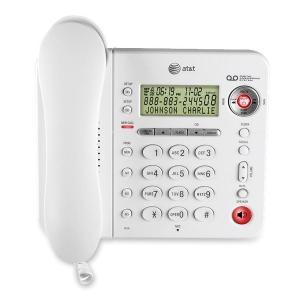
 If voicemail is playing out loud on your white, AT& T 1856 phone, it means you have “call screening” on. You probably want to turn it off! Here’s how:
(See pages 25-26 of your phone manual.)
Press and hold the “TAS Setup” button (top left of your phone). Keep pressing it; it will go through lots of different features until you reach “Call Screening.” When you finally reach “Call Screening,” hit the “Skip” or “Repeat” toggle button (top right of your phone) to change it from ON to OFF. Now, you won’t hear callers as they leave messages. Yay!